
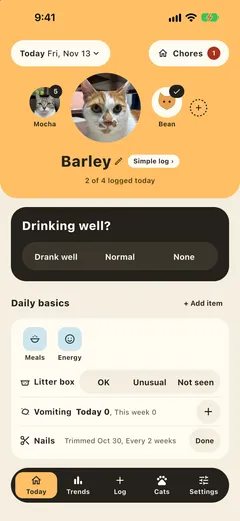
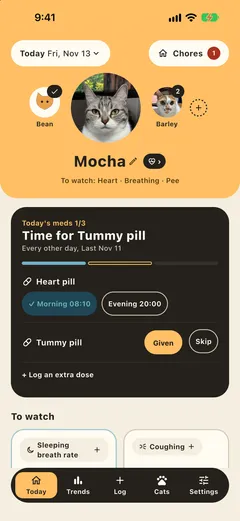
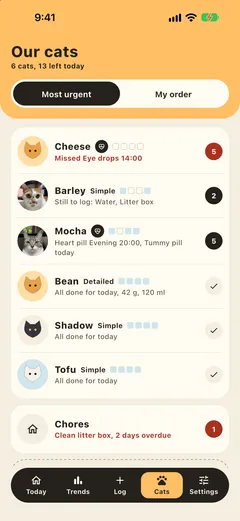
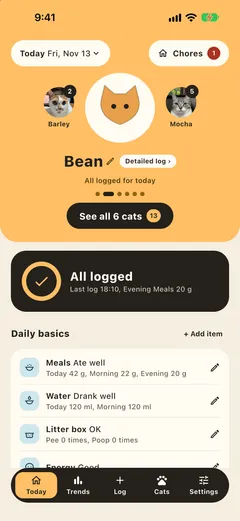
Maah is an iOS app for logging your cat’s day. It covers the daily basics, food, water and the litter box, through to medicine times and symptoms when your cat is unwell, all on one screen. A healthy cat gets the simple log, where you just tap; a sick cat gets care mode, which adds medicines and things to watch. It works in English, Japanese and Korean.
The cats and logs on screen are sample data.
What it does
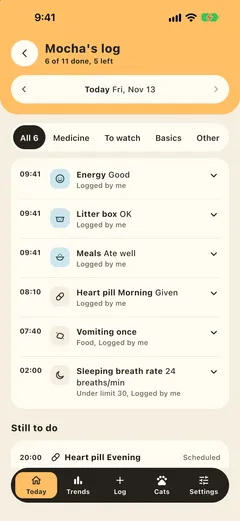
- Today on one screen: each cat’s remaining tasks are counted. Food, water and energy take one tap (Ate well, Normal, Refused), and the detailed log adds grams and millilitres
- Care mode: medicines several times a day, or every other day, weekly, monthly or at your own interval. A reminder arrives on time, and its “Given” button logs the dose without opening the app
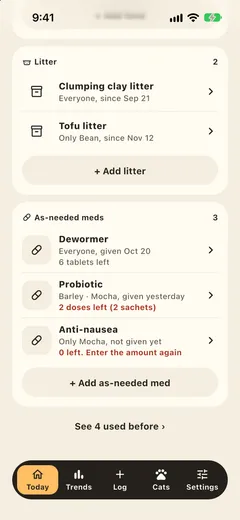
- What’s left: enter how much is left of each medicine and as-needed med, and it counts down with every dose, family doses included. A medicine gets a reminder on the day 7 days’ worth is left; an as-needed med gets a card on Today at two doses or fewer
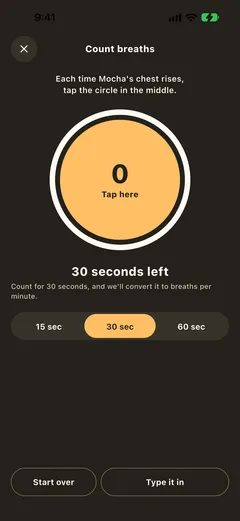
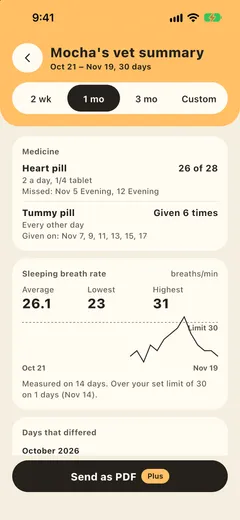
- Sleeping breath rate: tap the screen once per breath. A 30-second count becomes a per-minute rate
- Things to watch: switch on sets such as heart, kidney or urinary, and add your own items and sets
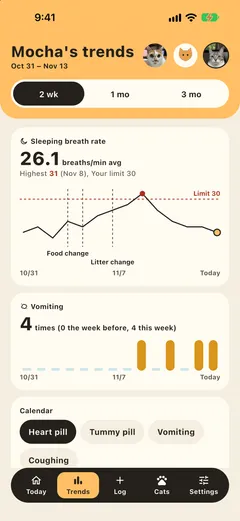
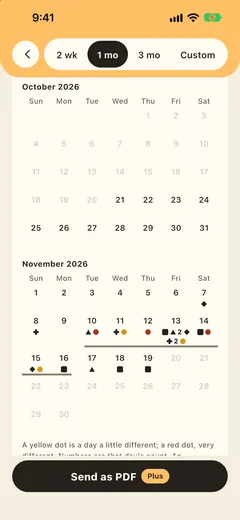
- Trends and history: a calendar for doses and graphs for numbers, from two weeks up to a year. Daily answers such as food, water and the litter box show as a table, one cell per day. Each day’s log shows photos, videos and notes, and you can fix entries
- Vet summary: medicines, measurements, weight and the days that differed over the period you pick (two weeks, a month, three months or your own dates), on one page. Counts such as vomiting and days with an unusual answer share one calendar, with how often per week below it. Show the screen as is at the vet; sending it as a PDF is Plus
- Show alongside: pick one log for each medicine, such as vomiting or sleeping breath rate, and it sits next to that medicine on the same dates in the vet summary, trends and calendar. The app does not say how the two are related
- Appointments: add vet visits, vaccines and tests, and get a reminder the evening before and that morning; anything in the next 7 days shows as a line on Today. After a visit, add the next one a year or three months on
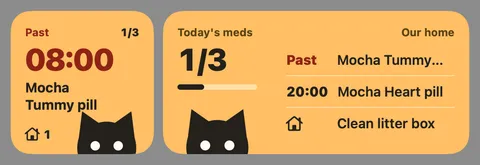
- Widgets: today’s remaining doses and chores on your Home Screen and Lock Screen. They move on to the next day at midnight without opening the app
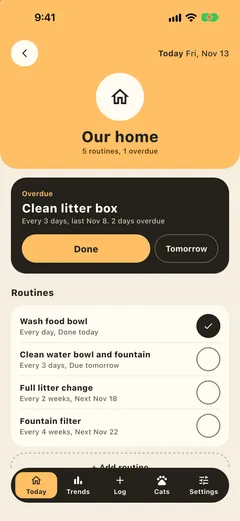
- Chores: litter changes, fountain filters and anything done every few days. If one slips, you see by how many days
- Several cats: each cat has its own Today screen; swipe between them. The overview puts the most urgent cat first
Free and Plus
It is free with no sign-in. The log stays on this device, and you can export and import a file to move to a new phone. Free covers 2 cats on the basic log and 1 cat in care mode. The vet summary screen, widgets, what’s-left counts and appointments are free too.
When you need more there are two options. More Cats is a one-time purchase that lifts the cat limits. Plus (monthly or yearly subscription) removes the limits, lets you log on your other devices and with family, and sends the vet summary as a PDF. First-time subscribers can try it free for 14 days. Family members are invited with a link: it opens the app’s invite screen with the code filled in, or, without the app, a page with the code and a link to the App Store. Prices are on the App Store.
Maah is not a substitute for veterinary care.
Judgment calls
There is a server only for homes on Plus. On the free tier there is no account, and neither the log nor photos leave the device. The server’s only job is to keep the same log on other devices and with family, so only homes on Plus sign in with Apple and sync with a server in Seoul. To keep the promise that signing in on another device brings everything back, a Plus home’s photo and video files go to the server too. Storing files costs money, so each home gets up to 5 GB; past that only the files stop, and the log keeps syncing. When Plus ends, the files on the server are kept for 90 days, so there is a way back.
Hitting the limit never silences a medicine reminder. A cat over the free limit becomes read-only. Medicine still has to be given on time, so the reminders keep coming, and their “Given” button can always log the dose. The medicine card in the app also keeps working for 7 days after the lock, so the log does not break the moment it happens. Reminders are scheduled on the device with no server, and “Given” logs straight from the notification even when the app is closed.
On an off day, the owner says what the dose was. When a medicine due every other day or once a week is given on a day it is not due, the app cannot tell whether it was an extra dose or the next dose given early. So it asks you to pick “Extra dose” or “Gave it early”, and it will not save until you do. The moment you pick, one line says whether the next dose stays or moves. If it was given early, counting restarts from that day and the reminders follow the new schedule.
The sets of things to watch are the owner’s checklist. The eight built-in sets, such as heart and kidney, are not standards set by a vet; they are things an owner keeps an eye on at home. The items draw on owner guidance from veterinary schools and associations, and the sets will change as people who use the app ask for it. The app does not fill in limits either. Even where a guide gives a number, as for sleeping breath rate, it leaves the limit blank and the owner enters the value from their vet. The red on an observation only means it crossed a limit the owner set, or that the owner picked the worse answer. It is not a diagnosis.
Widgets get seven days in advance. A widget never opens the log; it reads only a small bundle the app writes for it. We left the log where it was so that nobody’s records had to be moved for widgets, but that means a widget cannot work out the next day’s doses on its own. So the app writes the doses and chores for the seven days starting today, and at midnight the widget simply moves on to the next day. “Open the app once” appears only the first time and after more than seven days without opening it. Doses a family member gives show up once the app has received them.
The server changes only the fields it is sent. When a new version comes out, not everyone in a home updates at once. An older app does not know new fields such as 1.1.0’s “Show alongside”, so if the server overwrote a whole record with the row an older app sent after editing a medicine, the choice made in the new app would be lost. So the server changes only the fields it receives in a row and leaves the rest as they were. A field is cleared only when it is sent empty.
What’s left is not kept as one number. When the same record is changed in two places, the later change wins. If what’s left were one number reduced with each dose, a dose you and a family member log at about the same time would lose one of the subtractions. So only the amount the owner entered and when are stored, and what’s left is worked out each time: that amount, less the amount per dose times the doses logged since. Family doses count as they are, and deleting a dose puts it back.
On a phone with the app closed, a notification extension clears your reminder. When the notice that a family member gave a dose arrives, your phone’s reminder for that dose has to go, or the cat gets it twice. In 1.0.1 the app woke in the background to do this, but iOS does not wake an app the user has fully closed for a silent notification. So in 1.1.0 the family notices that show on screen carry a flag, and a small notification extension on the device clears your reminder for that dose and its 30-minute follow-up before the notice is shown. Nothing is sent to the server. A phone with family notices set to Off gets nothing on screen, so the extension does not run, and there the reminder still goes when the app wakes.
Releases
1.1.0
- New: Vet summary. Medicine, breathing rate, weight and the days that differed on one page. With Plus, send it as a PDF.
- Pick a log to show alongside each medicine and see them side by side in the vet summary, trends and calendar.
- Home Screen and Lock Screen widgets show today’s remaining doses and chores, and move on to each new day without opening the app.
- Enter how much is left of each medicine, as-needed meds too, and get a heads-up before it runs out.
- Add vet visits, vaccines and tests, and get reminders the day before and on the day.
- Trends now go back up to a year.
- Trends show daily answers like food, water, litter box and energy, one mark per day.
- Invite family with a link.
- Even with the app fully closed, your own reminder clears when a family member gives that dose.
- First-time subscribers can try Plus free for 14 days.
- The app tells you if you’ve been signed out, and you can send feedback or redeem a code from Settings.
1.0.1
- When a family member gives a dose, your phone gets a notification and your own reminder for that dose stays quiet. No more double doses.
- If a dose isn’t logged within 30 minutes of its time, you get a second reminder.
- Choose which reminder times ring on your phone.
- Entries from family show up while the app is open.
- Hand over the home to another family member.
- Family members get a heads-up before the home’s Plus ends.
- Dark mode, following your device’s setting.
1.0.0 — Released on the App Store