
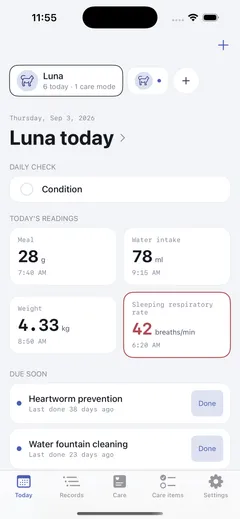
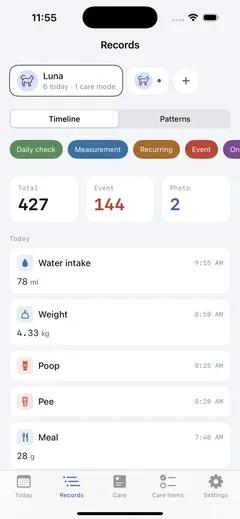
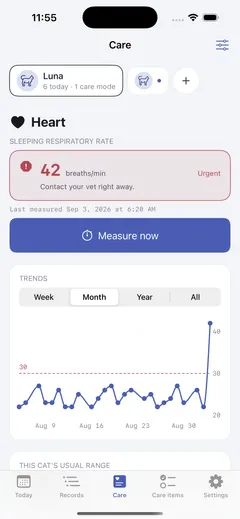
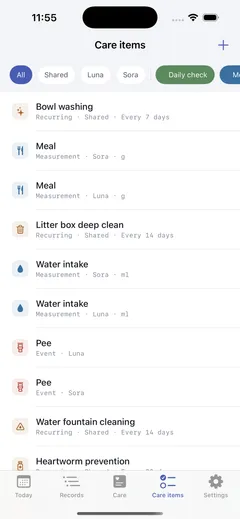
An iOS app that puts a multi-cat household’s daily care and health changes on a single timeline. Available in Japanese, Korean, and English.
What it does
- Trace cause — food changes, litter changes, and the start of a medication land on the same timeline as symptoms. “Did the vomiting start right after I switched food?” gets answered from the record, not from memory
- House-level care — some chores belong to the house, not to a cat: scrubbing a litter box, swapping a water fountain filter. Per-cat records and shared records are kept apart
- A pattern engine — a tracked item is data, not a feature. Every item is built from five patterns — daily check, measurement, recurring, event, chronic condition — so twenty more items add no code
- Care mode — when a cat has a chronic condition, what matters for that condition moves to the front: a sleeping respiratory rate timer, blood glucose and insulin, per-condition dashboards, emergency guidance
- Records stay on the device — local-first with file protection; only the backup goes to iCloud. No account, no server
Why I built it
This is the third attempt.
2026-02 · NyanLog (Flutter). I built over a hundred features, and that is why it stopped. The stack was never the problem — not deciding what to cut was.
2026-05 · Chronicat (SwiftUI). I rebuilt from the skeleton. The principle that carried forward came from here: twenty items are not twenty features — an item is data, a pattern is code. It stalled at five screens.
2026-08 · Chronyan. I merged the two repositories. Most of that merge was not addition but subtraction — fifteen of the hundred existing features became preset data, thirty-five moved out of v1, and the screens collapsed to seven. Six kinds of notification became one reminder setting per item.
Judgment calls
Market research knocked down two of the things I meant to lead with. “Multi-cat support” was already free in a competitor with 1,400 reviews, and “SRR measurement” is given away by pharmaceutical companies as standalone apps. So I changed the pitch — the durable difference was context, not the feature. An app that only measures SRR does not know whether that number belongs to the day you switched food.
Being unreleased was the only opening. Neither app had ever shipped, so the schema could be redesigned from scratch. With a single real user, that call would have been off the table.
I chose native. On cost alone, staying on Flutter was cheaper — 17.5 weeks with Android included, against 25 weeks for iOS alone. I went with SwiftUI anyway, on cold start, photo thumbnail scrolling, Dynamic Type and VoiceOver, and widgets. Android is deferred, not dropped; I’ll decide again after iOS is in real use.