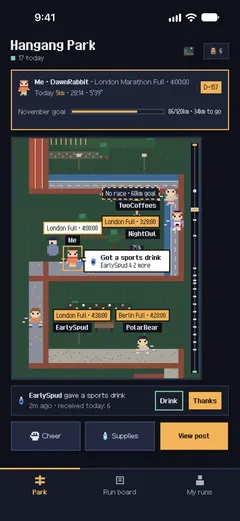
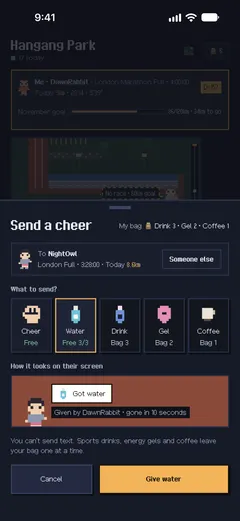
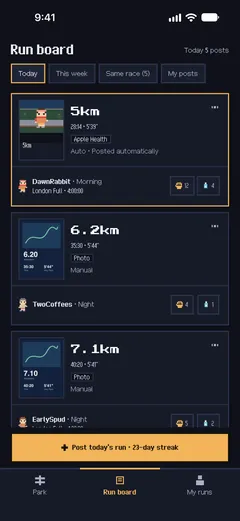
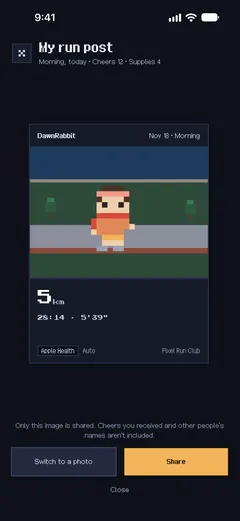
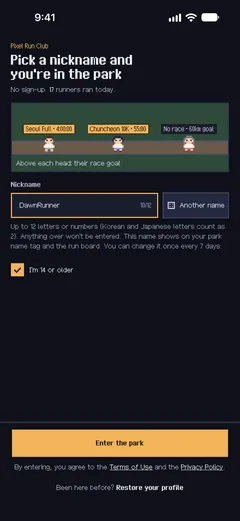
An iOS app that keeps only one thing from running with others: the sense that someone else is training too. Nobody looks at a screen while running, so home is not a live feed but a park that fills up as today’s runs come in, and cheers arrive as push notifications before and after a run. It works in English, Japanese and Korean, and is on the App Store in Korea, Japan, the US, Canada, the UK, Ireland, Australia, New Zealand and Singapore. On the Korean App Store it is called 같이뛸래.
The nicknames and runs on screen are sample data.
What it does
- Into the park with no sign-up — pick a nickname, a goal race, a course, a goal time and a distance goal for the month, and you are standing in the park. Without a race you start as “No race · 60km goal”
- A path to this month’s goal — as this month’s distance adds up, you move up the park path from the start line on the 1st to your own monthly finish line. Whether the goal is 60 km or 1,000 km it is the same path, so the signs by the path mark 25%, 50% and 75% of the goal rather than kilometres, and your goal (e.g. London Full · 4:00:00) floats above your head
- Runs from where you already keep them — runs come in from Apple Health or Garmin Connect; without either, you type the distance and time when you post. The app does not track GPS itself
- Races at home and abroad — pick from a list of races in Korea, Japan and more, or enter your own. D-day and race day follow the date where the race is held
- Three languages, everyone’s own time zone — from the screens to cheer notifications and cards, the app speaks English, Japanese and Korean. “Today”, the monthly goal and notification times follow each person’s own time zone, and a run’s dawn, morning, midday, evening or night follows the clock where it was run
- Cheers and supplies instead of words — a cheer and water (3 a day) are free; sports drinks, energy gels and coffee come out of your bag and go to other runners. No text can be sent
- Run board — post a photo or a run postcard made by the app, with distance, time and pace only. No comments; your posting streak builds up
- Outfits from the cheers you get — outfits can’t be bought; they unlock with the cheers you receive and the supplies you give. December has a limited winter event item
- Month-end podium and race day — on the last day of each month everyone who met their monthly goal stands on the podium (achievement, not ranking), and on race day you get a card of the others running the same race
- Four backgrounds — Hangang Park, Local park, Track and City at dawn. The park changes from dawn to night with the time zone you are in, and in Korea it also takes on the real weather
- Reports, blocks and moderation — you can report nicknames and posts and block people; a post reported by three people is hidden until a moderator looks at it
Judgment calls
Chat was cut, leaving only cheers and supplies. Accepting text means filtering abuse and disputes, and it widens what store review treats as user-generated content. The app does not send text, and the server has no field to receive a message either.
Firebase is used for push alone. iOS push has to go through APNs, so that single job is handed over. Accounts, runs and photos stay on our own server; device identifiers stay in our database too, and only the sending goes through the server. No analytics or crash reporting tools are used.
It starts anonymous, and keeping your profile is a choice. Only a random token lives on the device and the server keeps just its hash, so no email address or phone number is collected. Only people who want to carry on after changing phones link Apple, Google or Kakao sign-in. Store review requires Sign in with Apple wherever Kakao sign-in is offered, so both went in together.
The evening reminder is advertising, so it starts off. A reminder sent on the evening of a day you didn’t run counts as advertising, so it goes only to people who opted in. The date and screen of consent are recorded, people are asked again every two years whether they still want it, and it can be turned off at any time from My runs.
Race day is counted by the date where the race is held. For someone in Seoul training for the Boston Marathon, a race day counted on Seoul’s date would arrive nearly a day before the starting gun. So a race from the list counts D-day, race day and the moment the race is over in that race’s time zone. A race you enter yourself comes without a place, so its time zone is unknown and it follows the time zone of the person whose goal it is. Finishing a race you entered yourself is judged by the date where the run started, so the result stays the same after you fly home and your time zone changes.
Weather shows only in Korea, so the screen outside Korea was designed on its own. Weather comes from the Korea Meteorological Administration’s very-short-range forecast, which covers Korea only. Outside Korea the weather chip and the postcard’s weather are left out and only the park’s colours follow day and night in that time zone, and the location permission, which would have no use there, is not asked for. Most people on the Japanese and English stores are outside Korea, so those stores’ screenshots show this screen without weather.
The winter event was split into one for Korea and one for the other eight regions. The winter scarf goes to anyone who first enters the park between December 1 and 31 on their own calendar, but an in-app event on the App Store starts and ends at one moment worldwide. So the event ends at midnight on January 1 in New Zealand, the first place to reach the new year (8 pm on December 31 in Korea), and nobody who comes in from the event card misses the scarf. An already approved event cannot take text in a new language, so the Korean event stayed as it was and a second event with Japanese and English text runs in the other eight regions.
Releases
1.1.0
- Now in Japanese and English.
- Wherever you are, “today” and your monthly goal follow your own time zone.
- Cheer notifications arrive in your language. When the sender is racing that day, the notification says “Race day”.
- Clearer text and layout on several screens.
1.0.0 — Released on the App Store