
Paceform is a running coach that tells you the truth. Enter a goal time and it works out your split paces, then lines up every run and race against that plan.
Today on one card
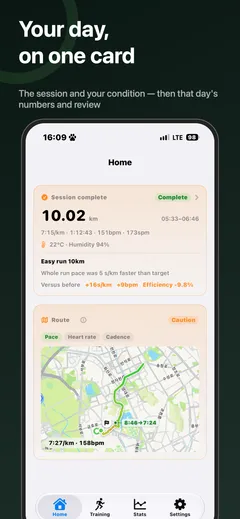
See today’s workout and your readiness. After you run, the card flips to that day’s review — distance, pace, heart rate, cadence, and the weather you ran in.
On your wrist
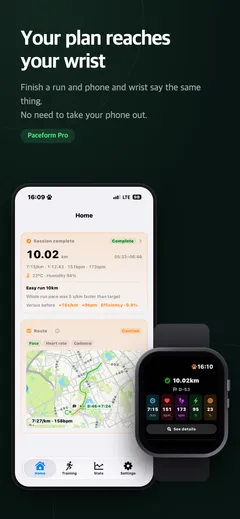
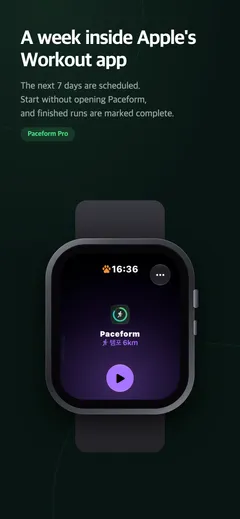
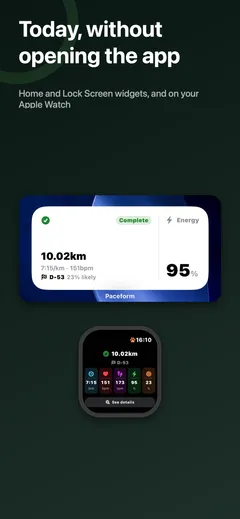
The next 7 days are scheduled into Apple’s Workout app on your Apple Watch. Start without opening Paceform, and the moment you finish, your wrist shows the day complete — with the whole training analysis behind one tap. It builds that on the spot even on a run away from your phone.
When the weather says no
Rain, snow, heat, and wind are read from the forecast where you actually are. On a hard day Paceform doesn’t just warn — it asks: move it to another day, swap it indoors, rest today, or run it anyway. Swap it indoors and a bike or treadmill session counts as that day’s training.
Honest verdicts
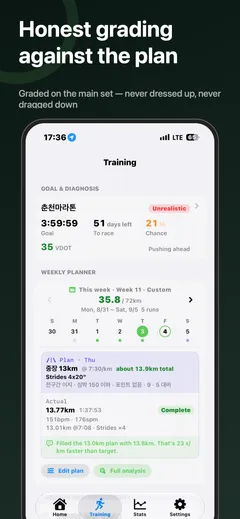
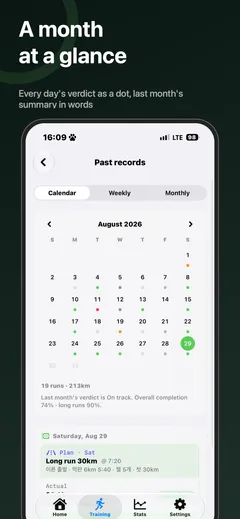
Plan vs actual, judged on the main session — warm-up and cool-down don’t pad your numbers. No sugarcoating, no shaming.
Weather-aware analysis
Heat and humidity change what a “good run” looks like. Paceform uses dew point and learns your personal heat response, so a slower pace on a humid morning is judged fairly.
Progress you can see
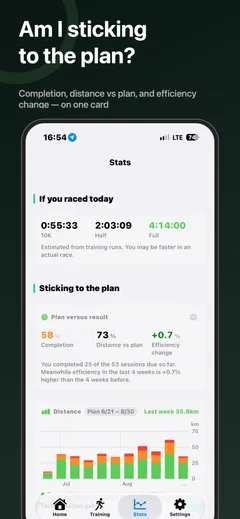
Every session is compared with your recent runs of the same type — pace, heart rate, and efficiency. Look back weekly and monthly with completion trends and plan-vs-actual charts.
Today without opening the app
Lock Screen and Home Screen widgets, plus an Apple Watch complication — today’s session, the run you just finished, and your energy at a glance.
Paceform Pro
Pro (7 days free) unlocks Watch delivery, 30 AI coach uses a day, and reading a training plan from a photo. The AI coach itself stays free — 8 a day, with no time limit — and verdicts, metrics, charts, and CSV import stay free too.
Private by design
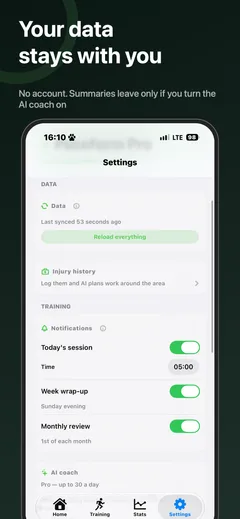
Your health data stays on your device. The AI coach is strictly opt-in — turned off, plans are built entirely on-device with no network at all.
Releases
1.1.4
- Changed — Tapping a notification now opens exactly what it mentions — today’s plan goes to the weekly planner, the week wrap-up to past records, the monthly review to the review itself
- Added — Notifications now show up even while the app is open
- Changed — Tapping the last-month review notice on Home opens the review right away
1.1.3
- Changed — Session analysis is split into a card per segment. Warm-up and cool-down get a verdict too, with a per-kilometre bar chart and the target pace line
- Changed — “Open Workout App” on Apple Watch now goes straight to the running screen
- Added — On long runs your wrist shows current pace next to the target
- Fixed — Opening session analysis could crash the app
1.1.2
- Fixed — Opening the app in the morning already marked today as missed. Today stays scheduled until the day is over
- Fixed — The same week’s planned distance was counted differently on different screens, so a week run exactly to plan raised “you’re already past the plan” and inflated the plan-versus-actual chart
- Changed — Dots in the weekly strip are open circles while planned and fill with the verdict colour once you run. VDOT is shown to one decimal
- Added — A line in the goal sheet explaining why your chance of hitting the goal drifts down each day: the weeks remaining are the denominator, so it falls even when your fitness holds
- Fixed — The wrist stayed stuck on yesterday after a run with the watch alone, and the iPhone widget sat empty from midnight until you opened the app
- Fixed — The goal flipped on race-day morning, and a monthly review could freeze at “0.0 km per week”
- Changed — Accessibility. Caution and danger text got real contrast, and calendar dots and the course card now speak to VoiceOver
1.1.1
- Changed — Stats regrouped around two questions, “Am I sticking to the plan?” and “Is the training working?”, led by a plan-versus-result card (completion, distance against plan, efficiency change). Only sessions due so far are counted
- Changed — Weekly distance bars are stacked by intensity. The same 50 km is a different week when it’s all easy than when intervals are in it
- Added — Days with reps split into a main-set card and a reps card, with per-rep pace as a bar chart and a table. When GPS couldn’t measure a 20-second stride, it says so instead of leaving a blank
- Added — Runs your Apple Watch couldn’t attach weather to are filled in from the forecast for that hour and place
- Changed — Long runs are called LSD, and the race card leads with the race name
- Fixed — When Stats is empty it says why, including when Health access was switched off
1.1.0
- Added — Apple Watch app. The next 7 days are scheduled into Apple’s Workout app, and a finished run shows complete with its analysis right on your wrist, even on a run away from your phone
- Added — Weather substitution. On a hard day it asks rather than just warns: move it, swap it indoors, rest, or run it anyway. An indoor swap counts as that day’s training
- Added — Read a plan from a photo, and edit any plan line by line as a table
- Added — Paceform Pro subscription (7 days free)
- Added — Pick the app language in Settings (한국어 · English · 日本語); widgets follow it
- Fixed — A run recorded by both Nike Run Club and Apple Watch now counts once
- Fixed — Session totals were overcounted when a workout had a warm-up and cool-down
- Fixed — A rain warning lingered into an evening run when the rain had only fallen that morning
1.0.2
- Fixed — The watch complication now refreshes when the day changes, even if the content is identical
1.0.1
- Fixed — Health permissions are granted in the Health app, not in iOS Settings; the guidance said otherwise
- Fixed — The permission sheet now says up front that its toggles arrive switched off
- Fixed — Markdown asterisks showed through in written reviews, and some translations were missing
1.0.0 — Released on the App Store
Works with Apple Watch running records via Apple Health.