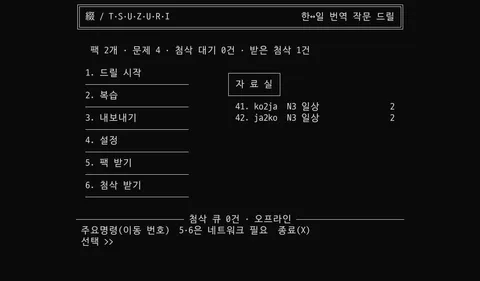
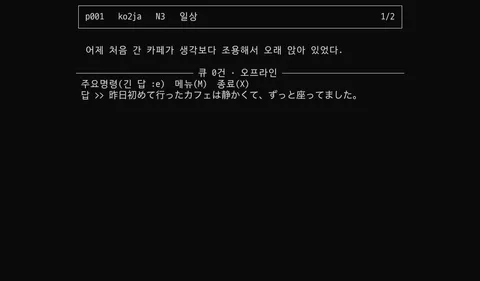
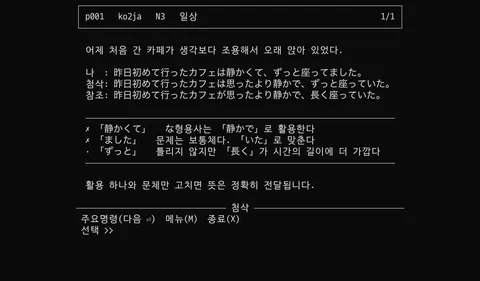
A two-way Korean↔Japanese translation writing drill that runs offline in the Debian mode of the King Jim Pomera DM250. A prompt appears in one language, you write it in the other, and you get feedback on what you wrote. Released under the MIT license.
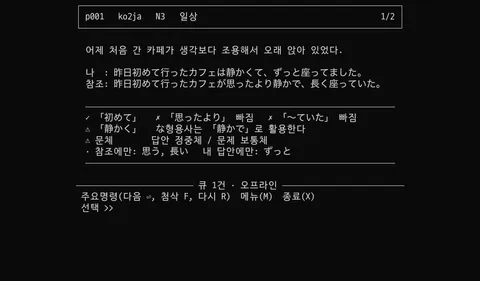
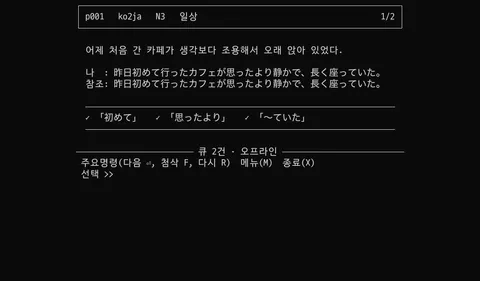
The screens above are renders: the real binary’s output from a virtual terminal, laid out at the Pomera’s 1024×600 resolution. They are not photos of the device, and the device’s font and column count haven’t been confirmed on hardware yet. The two analysis screens are real engine output; the correction text is sample data.
What it does
- Offline drills — once a problem pack is downloaded, prompting, writing and analysis all run without a network. The only online moments are fetching packs and collecting corrections
- Pointing things out with morphological analysis — it checks whether key expressions are missing, whether a form isn’t in the dictionary (typos, bad conjugation), and whether registers are mixed (Japanese polite and plain forms, Korean polite and plain endings), comparing down to dictionary forms
- A correction queue — correction requests pile up offline and come back together when Wi-Fi connects
- Review notes — exported as plain text files that the Pomera’s stock mode can read
Judgment calls
The device ruled out most of the options. A 32-bit ARM chip with 1 GB of RAM puts offline translation engines outside their supported architectures, and a local LLM runs but nowhere near usable speed. So on the device it only does what rules can do, and corrections that need judgment wait for a connection.
Go was chosen for one library: the morphological analyser. kagome is pure Go, so a 32-bit ARM binary builds in one step with no C dependencies. The dictionaries are embedded too, so installing means copying one file to the SD card.
It doesn’t give scores. A translation has many right answers but only one reference. Mark people down for differing from it and you teach them that correct answers are wrong. So the ✗ and ⚠ on screen are requests to double-check, not wrong-answer marks — and the data model has no score field at all.
No full-screen TUI. Reading keys one at a time risks breaking the path the Japanese input method (mozc) uses, and if you can’t type Japanese the app has no reason to exist. Input stays line-based, and navigation follows the layout of Korean dial-up BBSes like Hitel, where you move by typing a number — the same constraint produced the same answer.