
ntoday is an iOS notes app for the moment you think “oh, right”. Write things down however they come, and one word brings them back. There are no tags, no folders and no due-date fields. It reads the time, place and names in your sentence and files them for you. It was made with adults diagnosed with ADHD in their twenties and thirties in mind, and it works in English, Japanese and Korean.
All notes on screen are sample data.
What it does
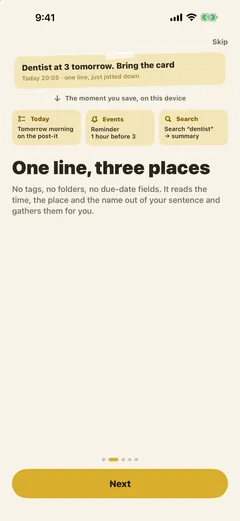
- One line, three places: write “Dentist at 3 tomorrow. Bring the card” and the to-do goes onto tomorrow morning’s post-it, the appointment gets a reminder an hour before, and the rest goes into search. It is sorted on the device the moment you save
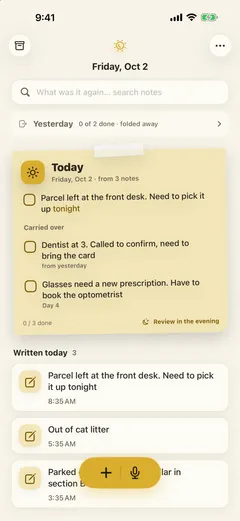
- Today: to-dos picked from today’s notes and anything carried over share one sheet of paper. Unfinished items move to the next day with a day count, and yesterday’s sheet is folded away
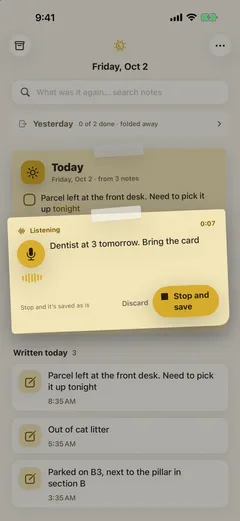
- Speak: tap the mic and your words are transcribed onto a post-it. Stop, and it is saved as is, with the original audio kept on the device
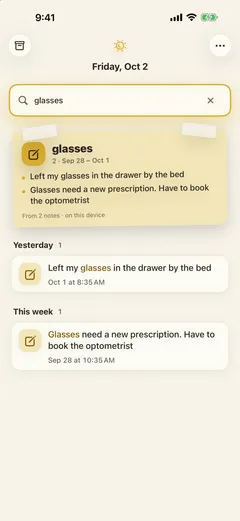
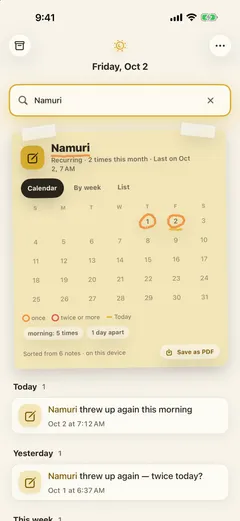
- One word to find it: search, and a post-it summarising the related notes in a few lines sits on top, with the original notes below grouped into Yesterday, This week and Last month
- Recurring records: when the same name or phrase turns up on several days, the search summary becomes a crayon calendar. Nothing to switch on; the notes turn into a log by themselves
- Apple Watch: check off today’s to-dos and dictate notes from your wrist
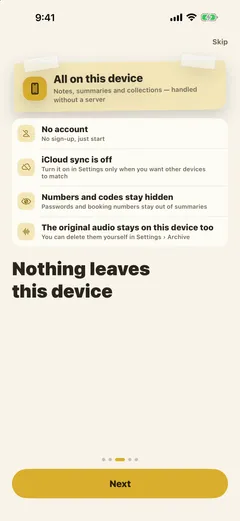
Nothing leaves your device
There is no account. Summaries and sorting happen on the device, with no server. iCloud sync starts off and is only for matching another device. Numbers and codes such as passwords and booking numbers stay out of summaries.
Judgment calls
The on-device model only helps. Foundation Models, which reads the notes, runs only on supported devices and has to be switched on in Settings. So the app had to do its job without it. Rules read every note first, and only notes the rules cannot place are passed to the model. Either way, nothing leaves the device.
Dictating on the watch takes one more tap. watchOS does not let code open the dictation sheet directly. So there is a Speak screen in between, and tapping it brings up system dictation. In exchange for the extra tap, the transcribed text stops at “Add it like this?” to choose between Add and Say it again before it goes to the phone. The watch sends only text and never records an audio file.
Counts instead of a trial period. Plus is a one-time purchase, and the App Store offers no free trial for that kind of product. A trial start date kept on the device would reset with a simple reinstall. So instead of a time-limited taste, the Plus boxes (money, people, numbers and codes, clippings) appear dimmed in the free version, and their item counts are always kept up to date. Tapping one shows what is inside. The app shows the work it has already done first and asks for payment after that. The to-do, appointment, where-did-I-put-it, shopping and repeated-entries boxes are free. Recurring records count the current month on the free tier and three months with Plus, and the tracker widget is part of Plus.
No streaks. The people this app is for put it down for a while and come back. Counting consecutive days turns the day the run broke into a failure, and an app remembered as a failure is hard to return to. So there are no streaks and no “you haven’t written anything today” notifications. Notifications come only in the morning, in the evening and an hour before an appointment, and unfinished items are never deleted: they move to the next day’s sheet with a day count.
Releases
1.2.0
- Bought and found dates — When everything on a shopping note is bought, or you tap Found on a place, the date is kept and carries over to your other devices and backups.
- Ask your search (Korean only for now) — Ask “how many” and a card answers by counting your notes.
- Everything is worked out on your device.
1.1.0
- Share to ntoday — In Safari or any app, tap Share › ntoday to save text or a link as a note. It’s filed at the time you shared it, the next time you open the app.
- Weekly tidy-up — When to-dos have waited over 7 days, Home shows one line once a week. Bring back, Take it down, or Keep — or just leave them.
- Search now spots repeat tracking from the last 30 days, so the tracker in search results no longer vanishes when a new month starts.
- Better at spotting to-dos like “Pick it up tonight”.
- New: Send Feedback in Settings › About. Your notes are never included.
1.0.0 — Released on the App Store